HomeDesigns AI Pricing 2026: Plans, Credits and Real Costs
HomeDesigns AI looks cheap, and per image it is. But Standard now costs $27 a month for a tenth of Pro's credits, the yearly price is a first-year discount, and refunds stop at 50 designs. We checked every number in October 2026 and worked out what a yard project costs.
HomeDesigns AI costs $27 a month for Standard, $29 for Pro and $37 for Expert, or $106.92, $132.24 and $168.72 for a first year paid up front. There's also a free allowance of a few credits a day. We loaded the live pricing table on October 24, 2026, and read the refund policy and terms the same day.
Those numbers have moved recently. Older reviews, and a fallback version of HomeDesigns AI's own page, still list Standard at $22 a month. The table that loads in the browser today says $27, and it crosses out several Standard features that the older copy showed as included. So if a blog post quotes you $22, it's out of date.
One disclosure: we make OutdoorBrite, an AI tool that redesigns yards from a photo, so we compete with HomeDesigns AI for some of the same customers. This post sticks to what HomeDesigns AI publishes. If you want our take on whether it's worth paying for at all, read is HomeDesigns AI worth it.
HomeDesigns AI pricing at a glance (October 2026)
HomeDesigns AI sells three self-serve plans through FastSpring, its payment processor. Every plan can be billed monthly or yearly, and the yearly price is a first-year rate.
| Plan | Monthly | First year, paid yearly | Per month on yearly | Credits per month | Styles and spaces |
|---|---|---|---|---|---|
| Standard | $27 | $106.92 | About $8.91 | 100 | 80+ |
| Pro | $29 | $132.24 | About $11.02 | 1,000 | 160+ |
| Expert | $37 | $168.72 | About $14.06 | 2,000 | 200+ |
The page rounds the yearly figures to $9, $11 and $14 a month and says yearly billing saves "up to 62%". Here's the live table as it loaded on October 24:
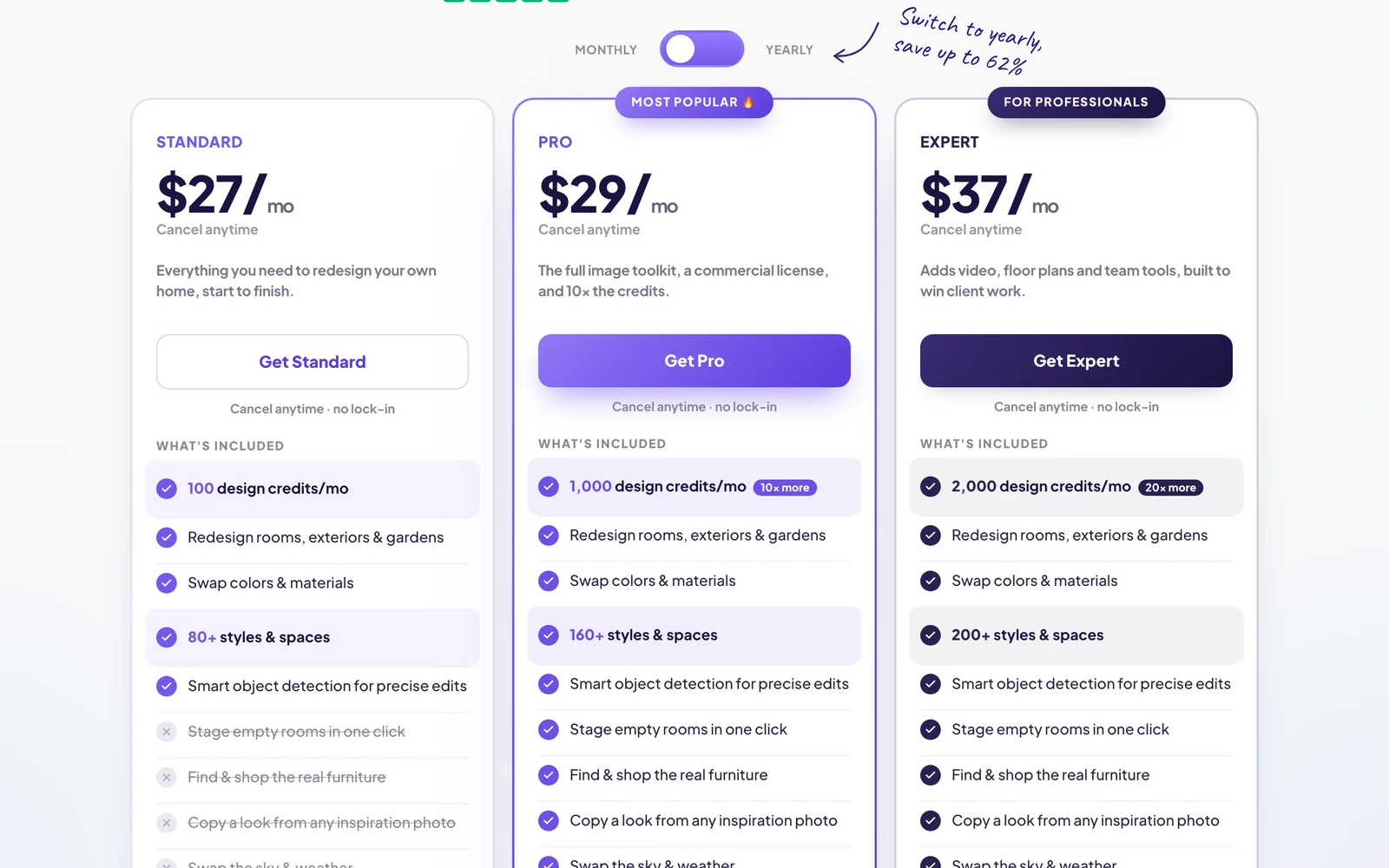
Look at the first two rows together. Pro costs $2 more than Standard each month and gives you ten times the credits plus the commercial license. On monthly billing, Standard is hard to justify.
What each plan includes
All three plans share the core: upload a photo of a room, a house exterior or a garden, pick a style, and get a redesign in about 30 seconds. One photo redesign uses one credit. Richer tools, such as video, use a few more.
Standard ($27 a month)
Standard gives you 100 credits a month, 80+ styles and spaces, color and material swaps, and object detection for precise edits. That's enough to redesign rooms, exteriors and gardens.
The live table crosses out everything else on Standard: virtual staging, the furniture finder, copying a look from an inspiration photo, the sky and weather swap, the commercial license with no watermark, video walkthroughs, 2D to 3D floor plans, the budget estimator and team seats. If you need any of those, Standard is the wrong plan.
Pro ($29 a month)
Pro is labeled "most popular", and for most people it's the right pick. You get 1,000 credits a month, 160+ styles and spaces, virtual staging, the furniture finder, the sky and weather swap and a commercial license with no watermark. That license matters if you'll put the images in a listing, a quote or a client deck.
Pro still leaves out video walkthroughs, floor plans, the budget estimator and team seats.
Expert ($37 a month)
Expert adds the last four: photo-to-video walkthroughs, 2D to 3D floor plans, a budget estimator for designs, and up to 5 team seats. You also get 2,000 credits a month and 200+ styles and spaces. HomeDesigns AI pitches it as the plan "built to win client work".
For a yard, the extras that matter most are the video walkthrough and the budget estimator. Keep in mind that any cost estimate tied to an AI image is a ballpark. It isn't a contractor's quote for hardscaping, plants and labor.
Is there a free version of HomeDesigns AI?
Sort of. There's no free plan in the pricing table, but there is a free allowance:
- The free landscape design page started us with 2 credits, no account and no card needed.
- Creating a free account adds 3 credits.
- Free users get 3 new credits every 24 hours after running out.
- Signing up for a HomeDesigns AI webinar unlocks 10 more.
The site also links a "free 7-day trial", but the pages we checked don't say which plan it covers, whether a card is needed, or what you're charged when it ends. Read the checkout screen carefully before starting it.
A few daily credits are enough to test one photo of your backyard in one or two styles. They aren't enough to work through a whole project.
Hidden costs and fine print
The yearly price only lasts a year. HomeDesigns AI's FAQ says the first year is a "welcome discount" and that the plan then renews automatically each year "at the standard price on the same card". The standard annual price isn't listed anywhere we could find. Expect the second year to cost more than the first.
Refunds have tight limits. The refund policy (last updated January 27, 2026) allows a refund request within 7 days of a subscription purchase, or 30 days for add-ons and one-time payments. There's no refund if you've generated more than 50 designs in the current cycle, and no refund for a renewal you forgot to cancel. The older terms of service (January 23, 2025) are stricter still, offering a 7-day refund only if you've made fewer than 7 requests. Assume the stricter reading.
Cancel before renewal, from the right place. The homepage says you can cancel in two clicks from Settings. The refund policy points to your FastSpring account portal, or to support. Cancelling stops the next charge; you keep access until the end of the term.
There are add-ons at checkout. The checkout we saw offered a one-time "Unlimited AI Designs" add-on at $19 (listed as down from $47), described only as removing the generation limit on your account. The free landscape page also mentions an "Extra Styles" add-on, and the FAQ says you can top up credits. None of these prices appear in the plan table, so check exactly what you're adding before you pay.
Prices can change. The terms let HomeDesigns AI change fees with notice, taking effect from the next billing cycle.
Nothing gets built. The subscription buys images. Plants, pavers, materials and labor are separate, and the AI doesn't let you pick specific plants or give you a plant list.
What a typical project actually costs
Two realistic cases, using the October 24 prices.
A homeowner redesigning a backyard over a month. Say you want to try a patio layout, a few planting styles and a front-yard refresh too, about 40 to 60 renders in total. Start with the free credits on one photo to see if you like the output. Then buy one month of Pro at $29 and cancel straight away so it doesn't renew. Standard would save you $2 and cap you at 100 credits, which is fine for 60 renders but leaves no room to explore. Don't buy a year for a one-month project. At $132.24, you'd be past the 7-day refund window long before you knew whether you needed it.
That works out to roughly 50 to 70 cents a render on one month of Pro. If you use all 1,000 credits, it's about 3 cents each.
A landscaper pitching 10 clients a month. You need the commercial license, so Pro is the floor. Ten clients at 15 renders each is 150 credits, well inside Pro's 1,000. On yearly billing that's $132.24 for the first year, or about $1.10 per client pitch over 120 pitches. Move to Expert ($168.72 a year) only if your clients respond to video walkthroughs or you need teammates on the account.
In both cases, the subscription is the cheap part. A landscape design is only as useful as the next step you take with it, and HomeDesigns AI stops at the image.
HomeDesigns AI pricing vs alternatives
Here's how it compares with the tools homeowners usually weigh it against for yard projects. HomeDesigns AI, Planner 5D and iScape prices were checked October 24, 2026; Yardzen's on October 20, 2026.
| Tool | Free option | Entry price | Top self-serve price | Cost per design, roughly | What you get |
|---|---|---|---|---|---|
| HomeDesigns AI | A few credits a day | Standard $27/mo (100 credits) | Expert $37/mo (2,000 credits) | Under 1 cent to 27 cents | Your photo redesigned; rooms, exteriors and gardens |
| OutdoorBrite | No | Starter $29/mo (25 redesigns) or $276/yr | Pro $149/mo (200 redesigns) or $1,428/yr | 39 cents to $1.16 | Your yard photo redesigned in a landscape style, plants for your region on Plus |
| Planner 5D | Yes, no time limit | Premium $19.99/mo or $59.99/yr | Professional $49.99/mo or $399.99/yr | Not per image | A 3D model of the yard you build from catalog objects |
| iScape | Free download, limited | Plus $14.99/mo | Pro $29.99/mo or $299.99/yr | Not per image | Photo-based design with an object library on iPhone and iPad |
| Yardzen | No | Small space from $295 | Backyard $995 to $1,995 | One plan per project | A human designer's plan with renders and a plant list |
On price per image, HomeDesigns AI wins, and it isn't close. OutdoorBrite costs more per render: $29 a month for 25 redesigns, $49 for 100 or $149 for 200, about 20% less on annual billing. What that buys is a tool built only for outdoor spaces, with landscape styles like desert, cottage and Mediterranean, and on Plus a plant list matched to your region and hardiness zone. There's no free tier to try first, and like HomeDesigns AI, it gives you visual concepts, not measured plans.
If your project is mostly the yard, OutdoorBrite's AI landscape design is the fairer comparison. If it's the kitchen, the siding and the yard together, HomeDesigns AI's breadth is hard to beat at $29.
We compared more yard-focused options, with their own prices, in HomeDesigns AI alternatives.
How to save on HomeDesigns AI
- Skip Standard on monthly billing. Pro is $2 more for 900 extra credits and the commercial license.
- Use the free credits first. Test one real photo before paying anything. The webinar adds 10 more if you need a second look.
- Buy one month for a short project. Pro at $29, cancelled the same day, beats a yearly plan you'll forget about.
- Go yearly only if you'll use it all year. Realtors and contractors get the most from $132.24. Put the renewal date in your calendar, because the second year renews at a price that isn't published.
- Ask for a refund early. If it isn't for you, request it within 7 days and before 50 designs.
- Ignore the countdown. The "Early Bird" banner and the checkout timer are sales tactics, not deadlines.
One more way to think about cost: price the decision, not the images. Most homeowners need a handful of concepts they can show a partner or a contractor, not 1,000 a month. If that's you, a backyard design tool with fewer, yard-specific redesigns may cost more per image and less per project. You can see how that works on OutdoorBrite.
FAQ
How much does HomeDesigns AI cost per month? On October 24, 2026, Standard was $27 a month (100 credits), Pro $29 (1,000 credits) and Expert $37 (2,000 credits). Paid yearly, the first year costs $106.92, $132.24 or $168.72, about $9, $11 and $14 a month.
Is HomeDesigns AI free? Partly. You get a couple of free credits with no card, 3 more for creating an account and 3 new credits every 24 hours, plus 10 for joining a webinar. Real projects need a paid plan.
Why do some sites say HomeDesigns AI costs $22? Standard used to be listed at $22 a month, and a fallback version of the page still shows that figure. The live pricing table we loaded on October 24, 2026, showed $27.
Does HomeDesigns AI offer a refund? Within limits. The refund policy allows requests within 7 days of a subscription purchase and 30 days for add-ons, but not after 50 designs in the cycle, and not for a renewal you forgot to cancel. Older terms are stricter, so ask early.
What happens when the HomeDesigns AI yearly plan renews? The yearly price is a first-year discount. After 12 months it renews automatically at the standard annual price on the same card, and that price isn't published. Cancel before the renewal date if you don't want it.
Do HomeDesigns AI credits roll over? The site says credits refresh every billing cycle and that you can top up. Neither the FAQ nor the terms say unused credits carry over, so plan to use them within the month.
Is there a cheaper alternative to HomeDesigns AI for yard design? For the cost of each image, not really. HomeDesigns AI Pro works out to about 3 cents a credit. For a landscape-only tool with plant suggestions for your region, OutdoorBrite costs more per design, starting at $29 a month for 25 redesigns.
Sources: HomeDesigns AI homepage and live pricing table, HomeDesigns AI free landscape design page, HomeDesigns AI landscaping page, HomeDesigns AI refund policy (updated January 27, 2026), HomeDesigns AI terms of service (updated January 23, 2025), Planner 5D pricing page, iScape on the App Store, Yardzen design packages page, all checked October 2026