Your Guide to Backyard Design Software Free Tools
Discover the best backyard design software free. Learn how to choose, use, and master free tools to create your dream outdoor space on a budget.
Absolutely. You can get your hands on some fantastic backyard design software free of charge. These tools are a game-changer for homeowners, giving you the power to sketch out layouts, play around with ideas for patios or gardens, and map out your project—all without spending a dime on a professional designer upfront.
Why Free Backyard Design Software is a Game-Changer
Before you start digging, it’s worth understanding how valuable these free design tools can be. They've grown in popularity because they simplify a once-complex process, making it accessible. The best part? You can experiment without risk. Swap a deck for a patio, move a fire pit, or add a water feature—try it all virtually before committing time or money.
Free Software vs Traditional Design Costs
The financial difference between starting with a free tool and hiring a designer can be significant. Here's a quick look at what you save by brainstorming your initial ideas yourself.
| Design Aspect | Free Design Software | Traditional Landscape Designer |
|---|---|---|
| Initial Concept & Layout | $0 (your time investment) | $500 - $2,500+ (consultation and basic plans) |
| Experimentation | Unlimited revisions at no cost | Additional fees for major changes |
| Material Visualization | Good, helps with basic selection | Excellent, often includes physical samples |
| Turnaround Time | Immediate, work at your own pace | Days to weeks, depending on schedule |
Ultimately, free software empowers you to develop a solid vision on your own terms, which is a massive advantage before bringing in professionals. This DIY-friendly approach is why the landscape design software market hit a valuation of USD 2.1 billion in 2024. Homeowners are now the fastest-growing user group, thanks to intuitive apps that make designing your space a creative project, not a chore.
Think of these free tools as your creative launchpad. Once you've nailed down a layout, you might be ready for more advanced tools. That's when many homeowners explore AI-powered platforms that can transform simple sketches into stunning, photorealistic visuals. For more inspiration, you'll find plenty of articles on our blog.
Choosing the Right Free Tool for Your Project
Not all "free" backyard design software is worth your time. The trick is to find the right tool for your specific job. Sketching a new garden bed is different from designing a multi-level deck with an outdoor kitchen.
Start by considering how you need to see your design.
- A basic 2D tool is fantastic for a bird's-eye view. It helps you nail down the layout, determine placement, and ensure walkways flow nicely. It's all about the floor plan.
- To feel the space, you need a 3D tool. This lets you visualize the height of a pergola or the depth of a new patio, bringing the plan to life before you break ground.
Next, explore the asset libraries. Many free tools have limited selections of generic plants and pavers, which can hinder your ability to create a design that matches your vision.
Look for software with a decent variety, especially plants suited to your climate. Reading user reviews is also a great idea. Real users will highlight hidden frustrations—like not being able to export your design or constant pop-ups urging you to upgrade. A little homework now can save a massive headache later.
Getting Your Ducks in a Row: Pre-Design Prep
Your digital design will only be as good as the real-world prep you put into it. Before opening a free backyard design tool, spending a little time upfront will guarantee your digital plan matches your actual space.
Start with a Tape Measure
First, grab a tape measure and head outside. Map out the full perimeter of your yard and sketch a simple plot plan on paper. It doesn't have to be perfect, just accurate.
Jot down all key dimensions. Mark the location of permanent fixtures—like a large tree, a garden shed, or an existing concrete patio. If your yard has interesting contours or slopes, like those in our guide to island landscaping ideas, noting those elevation changes is critical.
A design is only as good as the data it's built on. Skipping the measurement phase is the #1 reason digital plans fail in the real world, leading to frustration, wasted time, and costly mistakes.
Build a Photo Library
Once you have your measurements, grab your phone or camera and start taking pictures. Get wide shots from every corner to capture the overall feel, then move in for close-ups of specific areas you plan to transform. This visual library will be your best friend during the design process.
A Practical Workflow for Designing Your Backyard
With your prep work done, it's time to bring your vision to life on screen. Following a clear process when using any backyard design software free tool is the secret to getting great results without frustration. It all starts with creating your base map.
Think of this as your digital foundation. Plug in the measurements you took to create an accurate, to-scale version of your yard. Once set, you can start zoning the space—carving out specific areas for a patio, a play zone, or a quiet garden nook. This ensures every square foot has a purpose.
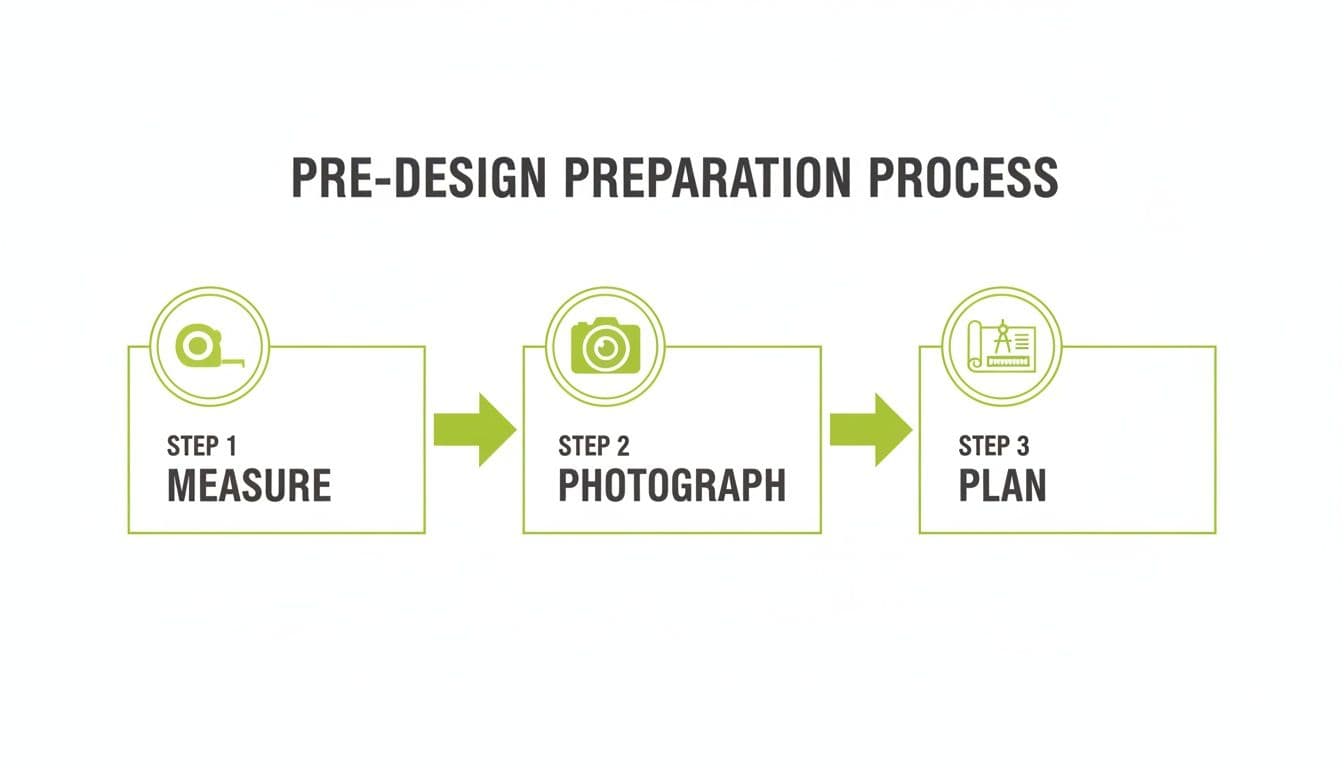
This simple flow—measure, photograph, plan—is your best defense against common design mistakes. By taking the time to do this upfront, you’re joining a massive movement of DIYers.
The global landscape design software industry rocketed to USD 5.26 billion in 2024, and residential users account for over 50% of that demand. You can read more about the rise of DIY landscape design to see how these tools are changing home projects.
When It's Time to Upgrade from Free to AI-Powered Design
Free backyard design tools are fantastic for hammering out your basic layout. You can map out patios, decide where garden beds should go, and get a solid feel for the flow. But eventually, you might hit a wall.
That wall usually appears when you try to visualize the finished project. Free software often struggles here, with clunky graphics and limited libraries that don't capture the real-world look you're after.
Making the Leap to a Smarter Tool
This is the perfect moment to consider an AI-powered platform. It's like handing your rough blueprint to a professional designer who can instantly bring it to life.
Instead of dragging and dropping every plant, AI tools like OutdoorBrite take your foundational plan and generate multiple photorealistic concepts in a snap. You get curated styles and intelligent suggestions that elevate your rough draft into a stunning, actionable vision. Go from a simple sketch to a magazine-worthy render in under 30 seconds.
The landscape software market is on track to hit USD 16.19 billion by 2035. Market research shows that 25% of people revise their designs five or more times to catch mistakes before they become expensive problems. This is where AI excels, making the iterative process fast and insightful.
If you’ve taken your free design as far as it can go and are ready to see what your yard is truly capable of, we're here to help. Don't hesitate to feel free to contact us with any questions.
Backyard Design Software: Your Questions Answered
Jumping into free backyard design software for the first time? It's natural to have questions. Let's tackle some of the most common ones.
Can I Really Get Professional-Looking Results?
Yes, but it depends on your definition of "professional." Free tools are fantastic for creating accurate, to-scale layouts. They’ll help you nail down the exact placement of your patio and ensure everything fits. You can produce a solid, functional plan.
However, they often fall short in creating stunning, photorealistic visuals. If you want a render that looks like a photo from a magazine, AI-powered platforms can deliver that polish much faster. They are built to turn a basic layout into a professional-grade visual without a steep learning curve.
What's the Biggest Mistake People Make When Starting Out?
Hands down, the most common pitfall is skipping the prep work. Many people get excited, open the software, and start designing without a plan.
The biggest mistake beginners make is jumping straight into designing without any prep work. An accurate plan is impossible without accurate measurements, leading to designs that simply don't fit in the real world.
Before you touch the mouse, go outside. Measure your yard meticulously, take clear photos, and gather inspiration. This initial groundwork is what separates a frustrating experience from a successful one.
Do I Need Any Design Experience to Use These Tools?
Absolutely not. Most free backyard design software is built for homeowners, not professional landscape architects. They typically use simple drag-and-drop interfaces and come with libraries of common items like plants, pavers, and furniture. If you can use a computer, you can use these tools.
How Can Free Software Help Me with My Budget?
While most free options don't have a built-in cost calculator, they are invaluable for estimating material needs. An accurate, to-scale design allows you to:
- Calculate the exact square footage for a new deck or patio.
- Determine the linear feet needed for fencing or garden edging.
- Count precisely how many shrubs are needed for a new garden bed.
This visual plan helps you avoid over-buying materials, letting you walk into the hardware store with a confident shopping list and a more realistic project budget.
Ready to transform your basic layout into a stunning, photorealistic vision? OutdoorBrite uses advanced AI to generate multiple design concepts for your yard in under 30 seconds. See your dream backyard come to life at https://www.outdoorbrite.com.