Home Design 3D Pricing 2026: What the Garden App Really Costs
Home Design 3D can cost $4.99 once or $59.99 a year for the same garden app, depending on which button you tap. We checked every store listing in October 2026 and lay out what each tier unlocks, what the free version blocks, and what a yard project really costs.
Home Design 3D's garden app, Outdoor & Garden, is free to download on iPhone, costs $4.99 to unlock for good, and also sells a $4.99 weekly or $59.99 yearly subscription. The main Home Design 3D app, which also does gardens, runs from $9.99 on Steam to $79.99 a year on iPhone, depending on the platform and the plan you pick. We checked every store listing and the developer's own offers page on October 24, 2026.
That spread is the whole story. The same company sells the same kind of tool as a one-time purchase, a weekly subscription and a yearly one, with different names on different stores. If you only want to sketch a backyard, you can spend $5 or $60 for very similar results, so it pays to know which button you're tapping.
We make OutdoorBrite, an AI tool that redesigns a yard from a photo, so we compete with Home Design 3D for some of the same people. We've stuck to prices and features the developer publishes, with sources at the end.
Home Design 3D pricing at a glance (October 2026)
Home Design 3D is sold as several separate apps. For yard work, the one that matters is Outdoor & Garden. The main app is built for houses and interiors but includes garden items and is the only version on PC through Steam. Prices below are US store prices checked on October 24, 2026.
| Product and plan | Price | What it unlocks | Platform |
|---|---|---|---|
| Outdoor & Garden, free download | $0 | Try the 2D and 3D garden planner | iPhone, iPad, Android |
| Outdoor & Garden, "Unlock the full version" | $4.99 once | Full app, no subscription | iPhone, iPad |
| Outdoor & Garden, weekly premium | $4.99 a week | Premium features, auto-renews | iPhone, iPad |
| Outdoor & Garden, yearly premium | $59.99 a year | Premium features, auto-renews | iPhone, iPad |
| Outdoor Garden, paid edition | $3.99 once | Older paid listing, last updated July 2025 | iPhone, iPad |
| Home Design 3D (main app), Gold | $9.99 once | Saving, full object library, sharing, no ads | Steam (Windows, Mac), Mac App Store |
| Home Design 3D, Gold Plus | $9.99 add-on on Steam; $15.98 bundled with Gold | Adds more floors, advanced roofs, .obj export | Steam, Mac App Store |
| Home Design 3D (main app), subscriptions | $4.99 a week; $12.99 to $22.99 a month; $44.99 to $79.99 a year | Premium features, auto-renews | iPhone, iPad, Mac |
On Android, Google Play lists in-app purchases of $4.99 to $59.99 for Outdoor/Garden and $0.99 to $59.99 for the main app, without naming each item.
What each plan includes
Freemium (the free download)
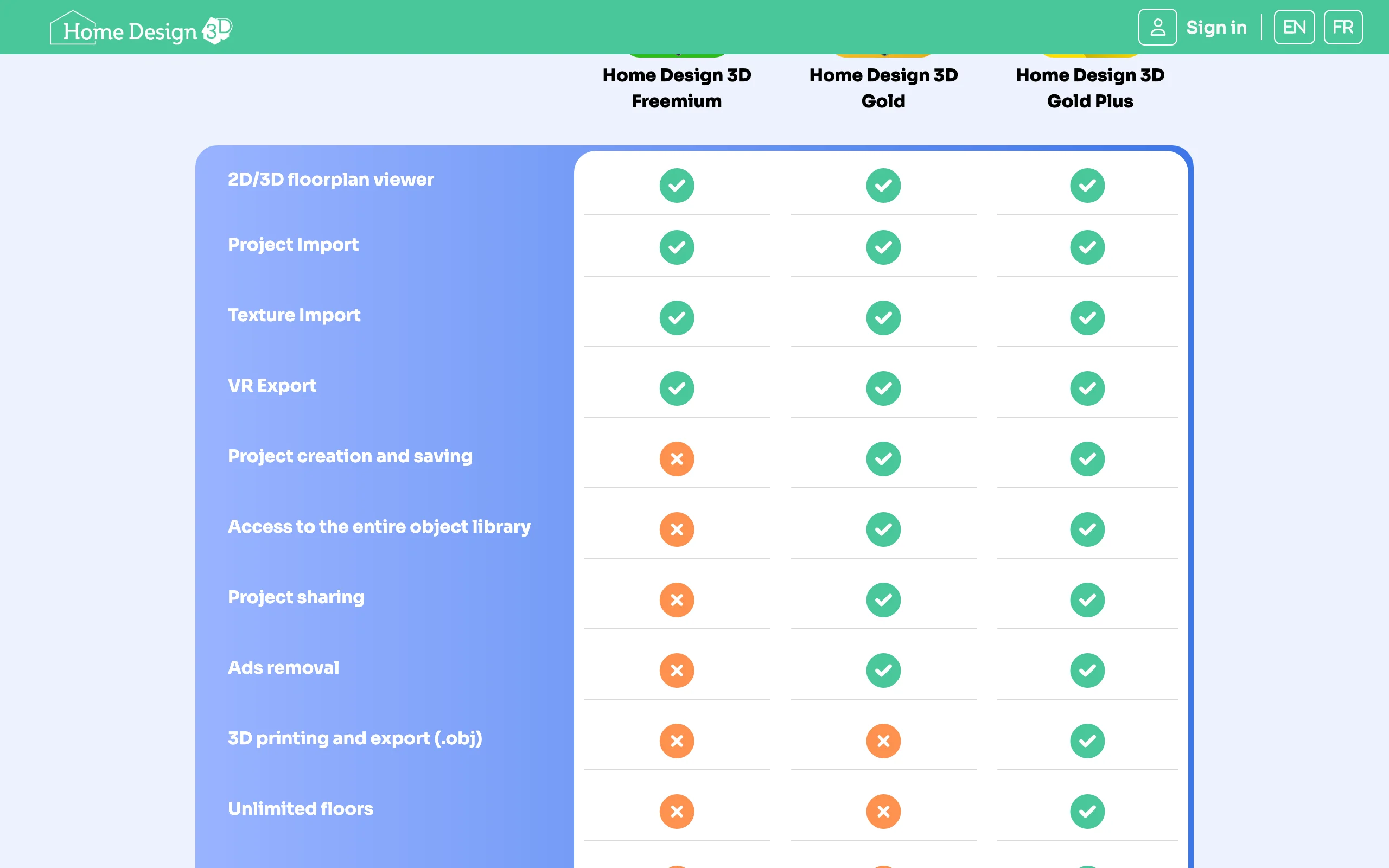
The free version lets you open the 2D and 3D planner, import a project or blueprint, import textures and export to VR. According to the developer's comparison table, it doesn't let you create and save projects, use the whole object library or share, and it shows ads. In practice, that makes it a test drive. You can see how the tool works, but you can't keep a plan.
Gold (the one-time unlock)
Gold is the tier most garden planners need. It adds project saving, the full object library, project sharing and ad removal. On the Outdoor & Garden iPhone app, this is the $4.99 "Unlock the full version" purchase. On Steam, Gold is the $9.99 base game. The outdoor library covers more than 100 items, including garden furniture, trees, plants, pools, greenhouses and fences, plus thousands of textures for paths and hardscaping.
Gold Plus
Gold Plus adds 3D printing and .obj export, no cap on floors and advanced roofs. Those are house features. For a yard, the extra floors only matter if you're modeling a multi-level garden or a deck over a slope. Most people planning a paver patio and some beds won't need it.
Weekly and yearly premium
The subscriptions unlock the app's "premium features," but neither the App Store listing nor the developer's site lists which features are behind them. On the main app, the App Store shows several monthly and annual price points with no plan names, which suggests the price you see may vary by offer. If you're only after the garden planner, the $4.99 one-time unlock is the plan to look for first.
Is there a free version of Home Design 3D?
Yes, but it can't save. Outdoor & Garden and the main app are both free to download on iPhone and Android, and the free tier lets you draw a plot and look at it in 3D. Saving projects, the full object library and sharing need Gold or a subscription. Some subscriptions include a free trial ("on selected subscriptions only," per the App Store terms), and any unused trial time is forfeited when you buy.
One honest warning: a free garden plan you can't save is easy to lose. If you plan to spend an evening drawing your fence lines to scale, pay for the unlock before you start.
Hidden costs and fine print
- Auto-renewal. The weekly and yearly plans renew automatically unless you turn renewal off at least 24 hours before the period ends. The renewal is charged in the last 24 hours of the period.
- No refund on cancelling. Per the App Store terms, cancelling stops renewal, but the current period isn't refunded. Refund requests for store purchases go through Apple or Google, not the developer.
- Weekly pricing adds up. At $4.99 a week, a single month costs about $20, four times the one-time unlock on the same app.
- Separate apps, separate purchases. Outdoor & Garden and the main Home Design 3D app are different apps, and the Steam, Mac and mobile versions are bought separately. Unlocking one doesn't unlock the others.
- AR is iOS only. Viewing your garden in augmented reality works on compatible iOS devices.
- No plant advice. The app places generic plants and trees. It doesn't tell you what grows in your hardiness zone, so plant research is extra time or a nursery visit.
- No building costs. Like every design app, the price covers the drawing only. Materials and labor are separate, and they're the real budget. Our landscape design cost guide covers what the build tends to cost.
What a typical project actually costs
A homeowner sketching a backyard over a month. You want to try a patio, a lawn and a couple of beds before calling contractors. On iPhone, the $4.99 unlock on Outdoor & Garden covers it, so the cash cost is $4.99. If you tap the weekly plan instead and forget to cancel, four weeks costs $19.96 and the year would run to more than $250 at weekly rates. The real cost is time: you build every fence, path and tree yourself, object by object. A backyard design tool that works from a photo skips that step, but it costs more per month.
A contractor showing designs to 10 clients. On a PC, Gold plus Gold Plus as the Steam bundle is $15.98 once, and it has no per-client cost. That's cheap. The catch is that each client's yard has to be modeled by hand from measurements, and the result looks like a 3D model, not a photo of the client's own house. For a quick visual in a sales meeting, that's a lot of evenings at the computer.
Home Design 3D pricing vs alternatives
Home Design 3D is the cheapest tool here, and it's not close. What you get for that low price is a manual planner, though, not a design. Here's how it stacks up against other ways to plan a yard. iScape, DreamzAR and Home Design 3D prices are from US App Store listings checked October 24, 2026; Yardzen's are from its packages page, checked October 20, 2026.
| Tool | Price | How it works | What you end up with |
|---|---|---|---|
| Home Design 3D Outdoor & Garden | $4.99 once, or $59.99 a year | You draw the plot and place every object | A 3D model you built yourself |
| OutdoorBrite | $29 a month (25 redesigns) or $276 a year | AI redesigns a photo of your yard in a chosen style | Realistic concepts of your own yard |
| iScape | Free download; Plus $14.99 a month; Pro $29.99 a month or $299.99 a year | You place plants and hardscape on a photo | A marked-up photo and an item list |
| DreamzAR | $19.99 a month or $199.99 a year | AI photo redesign plus an AR walk-through | AI concepts and AR previews |
| Yardzen | From $295 (small space); $995 to $1,995 for a backyard | A human designer works from your photos | CAD plans, renders, plant list |
If price is the only test, Home Design 3D wins. If you'd rather upload a photo and see your actual yard in a new style, a tool for AI landscape design does that part for you, at a higher monthly price. And if you need a buildable plan, a design service costs hundreds but hands you drawings a contractor can price.
How to save on Home Design 3D
- Buy the one-time unlock, not a subscription. On Outdoor & Garden for iPhone, $4.99 once covers saving and the full library. Check the plan name before you confirm.
- Use Steam on a PC or Mac. Gold is $9.99, and the Ultimate bundle with Gold Plus is $15.98 at its standard 20% bundle discount.
- Skip Gold Plus for yards. Its extras are aimed at houses.
- Turn off auto-renewal right away if you start a trial, so it doesn't convert at the weekly rate.
- Watch for sales. Steam and the app stores discount the app from time to time, though we didn't see a sale on October 24, 2026.
Not sure Home Design 3D is the right tool in the first place? We weighed that in is Home Design 3D worth it, and our list of Home Design 3D alternatives covers the other options.
FAQ
How much does Home Design 3D cost per month? The main Home Design 3D app on iPhone lists monthly plans at $12.99, $19.99 and $22.99, and a weekly plan at $4.99. The garden app, Outdoor & Garden, has no monthly plan: it's $4.99 a week, $59.99 a year or $4.99 once to unlock, as of October 24, 2026.
Is Home Design 3D free? The download is free on iPhone and Android, and you can draw and view a plan in 2D and 3D. The free version can't save projects, doesn't include the full object library and shows ads. To keep your work, you need Gold or a subscription.
What is the difference between Home Design 3D Gold and Gold Plus? Gold adds saving, the full object library, sharing and no ads. Gold Plus adds .obj export for 3D printing, more floors and advanced roofs. For garden planning, Gold is usually enough.
Does Home Design 3D offer a refund? Subscriptions bought through the App Store aren't refunded for the current period when you cancel; access just runs to the end of it. Refund requests for app store purchases go through Apple or Google, so ask there if you were charged by mistake.
Is Home Design 3D a one-time purchase? It can be. The Outdoor & Garden iPhone app sells a $4.99 one-time unlock, and Steam sells Gold for $9.99 once. Both apps also sell weekly or yearly subscriptions, so read the plan name before you pay.
Is there a cheaper alternative to Home Design 3D? For manual garden planning, not really: $4.99 once is about as low as paid tools go. Alternatives cost more because they do more of the work. AI tools like OutdoorBrite redesign a photo of your yard for you, starting at $29 a month, and design services start in the hundreds.
Does Home Design 3D use AI? No. Home Design 3D is a manual planner. You draw the plot and place each item, and nothing redesigns your photo automatically.
Sources: Home Design 3D offers page, Home Design 3D Outdoor & Garden App Store listing, Home Design 3D Outdoor Garden paid edition App Store listing, Home Design 3D App Store and Mac App Store listings, Home Design 3D and Home Design 3D Ultimate on Steam, Home Design 3D Outdoor/Garden and Home Design 3D Google Play listings, iScape App Store listing, DreamzAR App Store listing (all checked October 24, 2026), Yardzen design packages page (checked October 20, 2026)