Landscape Design Software for Homeowners: Create Your Dream Yard
Explore landscape design software for homeowners and visualize your dream yard with easy tools and AI-powered features
Ever looked at your yard and felt stuck, unsure where to even begin? Landscape design software for homeowners is a creative playground for your outdoor space. It takes a picture of your actual yard and turns it into a digital sandbox, letting you experiment with different looks without any real-world commitment.
Think of it as your personal design assistant. You can try out new plants, map out a patio, or rethink the layout, all before you spend a single dollar or pick up a shovel. It’s all about planning your outdoor projects with confidence.
Visualize Your Dream Yard Without the Risk
A bare patch of lawn can be intimidating. You’re faced with endless questions and a nagging fear of making a costly mistake. This is where modern landscape design tools, especially those with AI features, shine. They take all that guesswork and financial risk off the table.
These tools give you the power to make smart, informed decisions because you can see precisely how different ideas will play out in your space.
The real magic is this: You get to see the finished project before it even starts. That instant visual feedback transforms a potentially stressful job into a fun, creative journey, making sure the final result is exactly what you had in mind.
Whether you're dreaming of a total backyard overhaul or just want to see how a new flower bed would look, these platforms provide the clarity you need. If you're looking for specific inspiration, you can explore unique concepts like the ones in our guide on island landscaping ideas.
Understanding Landscape Design Software
So, what exactly is landscape design software? Think of it this way: you could hire an expensive landscape architect to draw up plans for your yard, or you could become the designer yourself, armed with an incredibly smart digital assistant. That's the leap these modern tools offer homeowners.
What used to be clunky, complicated desktop programs for professionals has evolved into intuitive, web-based software that anyone can use. This shift is a big deal, and it's why the global landscape design software market is on track to hit $3.8 billion by 2033. It’s clear that how we plan our outdoor spaces is changing. You can dig deeper into this growing market for homeowners to see the trends.
Traditional Landscaping vs Modern Design Software
To grasp the difference, let’s compare the old way of doing things with the new approach. It's a night-and-day difference in control, cost, and creativity.
| Aspect | Traditional Landscaping | Landscape Design Software |
|---|---|---|
| Process | Relies on consultations, hand-drawn sketches, and multiple revisions. Can be slow and rigid. | Instant digital mockups. Test unlimited ideas in minutes and see realistic results immediately. |
| Cost | High upfront costs for professional design fees, often thousands of dollars before any work begins. | Low-cost subscriptions or one-time fees. Many offer free trials to get started. |
| Creative Control | You describe your vision, but the final interpretation is in the designer's hands. | You are in complete control. Tweak every detail—from plant placement to paver styles—until it’s perfect. |
| Visualization | 2D sketches or mood boards can be hard to visualize in your actual space. | Photorealistic 3D renderings show exactly how your yard will look in different seasons and times of day. |
The takeaway is simple: software puts the power directly into your hands, making the entire process more engaging and far less intimidating.
From a Simple Photo to a Full-Fledged Plan
The real magic is how accessible this has all become. The core idea is simple: you start with a photo of your own yard. From there, the software can generate dozens of professional-quality concepts in just a few minutes, completely transforming your space with different styles, plants, and features.
This is the fundamental shift—you no longer need any technical background or design skills to get started.
This makes professional-level design achievable for every homeowner, turning a once-exclusive service into a DIY-friendly tool for creating the perfect outdoor space.
What to Look for in Homeowner-Friendly Software
When you're tackling a DIY landscape project, not just any software will do. The best tools have specific features designed to take the headache out of the design process, turning a complex architectural task into a genuinely fun, creative experience.
Knowing what features actually matter will help you pick software that works for you, not against you.
The Non-Negotiables
Let's break down the capabilities that will make the biggest difference in your project.
-
Photo-to-Render Magic: This is a game-changer. The ability to upload a picture of your own yard and start designing right on top of it is priceless. It removes the guesswork and shows you exactly how your ideas will look in your actual space.
-
A Truly Smart Plant Library: You need more than just a list of pretty flowers. Look for a plant database that lets you filter by your specific climate zone, the amount of sun an area gets, and even water needs. This is the key to choosing plants that will actually thrive.
Bringing Your Vision to Life, Step by Step
So, how does this actually work in practice? Let's walk through a typical homeowner's journey with a modern AI landscape design tool. It's surprisingly straightforward.
Picture your backyard—maybe it's a little uninspired or just not living up to its potential. The process kicks off by simply snapping a "before" picture on your phone and uploading it to the software. No measurements, no complicated diagrams. Just one photo.
Next comes the fun part: choosing a vibe. Are you dreaming of a sleek, minimalist ‘Modern’ patio? Or maybe a tranquil ‘Japanese Zen’ garden? You pick a style that speaks to you, and the AI gets to work, generating a handful of completely new design concepts for your exact space. Instantly, you can see what's possible.
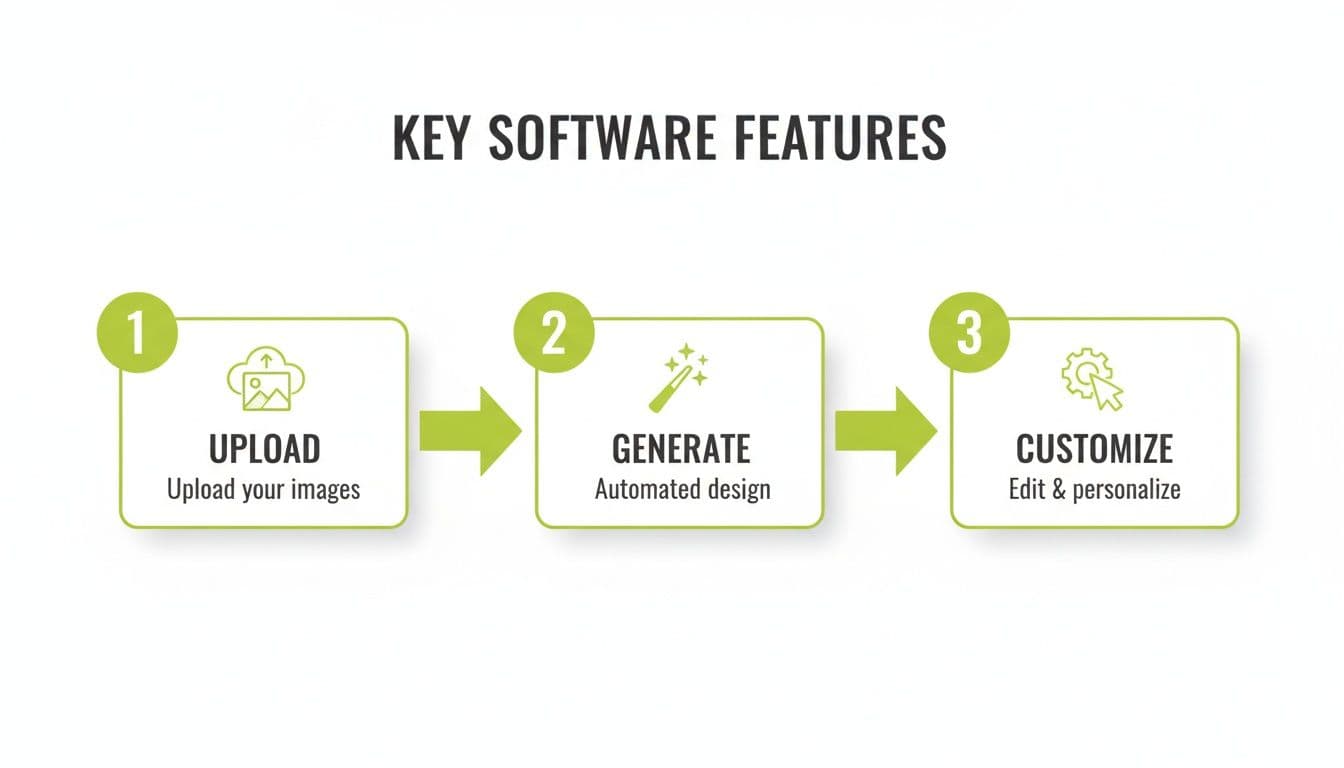
From there, you get to play creative director. Don't love that particular shrub? Swap it out. Wish the patio was larger? Stretch it out. You can add, move, and tweak every element—from outdoor furniture to lighting—until the design feels just right. What used to take weeks of guesswork and mood boards can now happen in a single afternoon, taking you from an idea to a concrete, visual plan you can actually build.
When looking at landscape design software, it's easy to focus on the price tag. But the real conversation isn't about cost—it's about value. A modest subscription fee is a drop in the bucket compared to hiring a professional landscape architect. More importantly, it acts as an effective safety net. Think of it this way: the software is a small, smart investment that helps you sidestep an expensive design mistake that could easily cost you thousands.
Getting your plan right on screen before you ever break ground is a game-changer. It gives you the confidence to create a solid budget, ensuring every dollar you spend builds toward the beautiful, cohesive yard you've envisioned. It's no wonder the market for homeowner-focused design tools is booming. You can dig into the numbers on the growth of the homeowner software market to see how popular these tools have become.
Common Design Mistakes and How to Avoid Them
Knowing what not to do is just as important as knowing what you want. Homeowners get excited and jump into a project, only to run into predictable problems. They might pick gorgeous plants that can't handle the local climate or design a stunning patio that blocks the natural path to the backdoor.
These mistakes are easy to make when sketching on paper, but they become expensive, back-breaking fixes once the work has started.
This is where design software becomes your best friend. Think of it as a digital dress rehearsal for your yard. Instead of realizing a walkway is too narrow after the pavers are set, you can spot the issue in a 3D model and fix it with a click. Good landscape design software for homeowners is fundamentally a tool for preventing expensive regrets.
By building a virtual model of your yard first, you can catch design flaws before you even break ground. This simple step transforms what would be costly real-world blunders into simple digital tweaks, making sure your final design works as beautifully as it looks.
With features like smart plant libraries that filter by climate zone and tools that keep everything to scale, you can sidestep these common pitfalls entirely. It’s all about saving time, money, and hassle down the road.
Still Have Questions? Let's Clear Things Up
Jumping into a new tool can feel daunting, so it's natural to have a few questions. Let's tackle some of the most common ones homeowners ask about landscape design software.
Do I Need to Be a Designer to Use This?
Not at all. That's the whole point. Modern landscape software is built with the everyday homeowner in mind, not a professional landscape architect. The process is often as simple as snapping a photo of your yard, picking a style you love, and letting the tool do the heavy lifting. Think of it as a creative partner, not a complex program.
Can This Software Actually Help Me Pick the Right Plants?
Absolutely, and this is one of its most powerful features. The best tools come packed with huge plant libraries that you can filter by your specific needs. You can search for plants that are perfect for your climate zone, the amount of sunlight a specific spot gets, and even your desired water usage. This is a game-changer for ensuring the plants you pick will actually thrive.
How Real Do the Designs Actually Look?
You'd be surprised. The AI-powered tools available today create stunningly photorealistic visuals. They're not just cartoonish sketches; they give you a genuine feel for how your space will look. The renderings are incredibly accurate when it comes to scale, color, and texture. Some even simulate how sunlight and shadows will look at different times of the day. This level of detail is exactly what you need to make decisions with confidence. For more tips, explore resources on our design and inspiration blog.
Which Landscape Design Software Should Homeowners Start With in 2026?
If you want the shortest path, start with our tested comparison of the 7 best landscape design software picks for 2026. Completely new to this? The easiest landscape design software for beginners roundup ranks the tools by how little learning they demand. Both cover free options, one-time purchases, and subscriptions, so you can match the price model to a single project or an ongoing yard plan.
Ready to stop guessing and start visualizing? With OutdoorBrite, you can transform a simple photo of your yard into a stunning, customized design in under a minute. Try OutdoorBrite today and bring your dream outdoor space to life.